

kegg Getting Started Guide
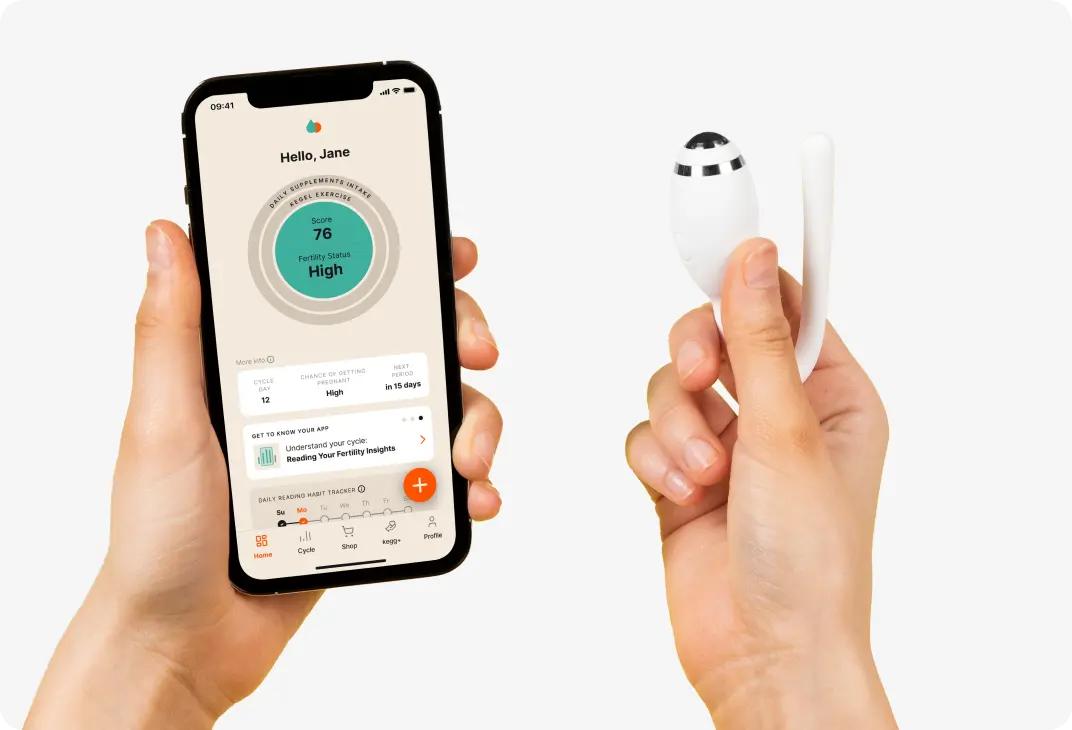
Getting Started with kegg
Connecting the kegg App
What You Need:
- kegg device
- kegg charging stand
- kegg charging cable
- Home USB power adapter
- Smartphone with internet or mobile data connection
Download the kegg App
Search for "kegg" in your smartphone's app store and follow the on-screen instructions to download it.
Unbox the kegg and Charger
The kegg package includes the device, charging stand, and charging cable. The charging cable must be connected to a UL-certified power adapter.
Insert the Charging Cable into the Charging Stand
Firmly insert the corresponding end of the cable all the way into the charging stand.
Connect the Cable to the Power Adapter
Connect the USB end of the charging cable to a UL-certified power adapter and plug it into an outlet.
Place the kegg on the Charging Stand
Firmly push the kegg into the charging stand so that its plated metal contacts the metal contacts on the bottom of the stand. While charging, a warm yellow light will slowly pulse. When charging is complete, the light will turn solid green.
Enable Bluetooth Low Energy on Your Smartphone
You need Bluetooth 4.0 to use kegg.
Set Up Your Account
After downloading the kegg app, follow these steps to set up your account.
- Open the app and select "Sign Up" to create a new account. If you already have a kegg account, select "Login".
- Follow the on-screen instructions to enter your information.
Next, you will be prompted to pair the app with your kegg. Follow the in-app instructions.
- Allow the app to connect to your kegg.
- You do not need to take a reading at this point. Take a reading every day at your set target time.
When to Start Using kegg
Start using kegg after your period has ended. If your kegg arrives mid-cycle, record your past periods in the app and wait until after your next period has ended before you start using it.
Consistency Is Key
To understand your most fertile times with kegg, it is important to use it consistently every day. Aim to take a reading every day that you do not have bleeding. However, we know that some days are busier than others. It is okay to forget to take a reading occasionally.
Set Your Target Time
To get more reliable and personalized information, aim to take a reading during the same two-hour window every day. If you miss that window for any reason, do not worry. Take a reading when you remember or when you are able to, even if it is outside the target window.
The measurement window is two hours, from one hour before to one hour after your target time. You can take a reading at any time during this window. When setting your target time, keep in mind that you cannot take a reading within eight hours after sexual intercourse.
Example: If your target time is 9:00 a.m., take a reading between 8:00 a.m. and 10:00 a.m.
If your set window does not fit your lifestyle, you can change the measurement time and reminder notifications by going to "Account" → "App settings" → "Reading Reminder".
How to Take a Reading
Find a Comfortable Position
You can take a reading while standing, sitting, or lying down. To get more reliable results, take a reading in the same position every day.
Choose a Measurement Method in the kegg App
When taking a reading, select the "+" in the circle in the center of the home screen. Choose whether to perform guided Kegel exercises (pelvic floor exercises) and take a reading, or take a reading only.
Note: You cannot complete Kegel exercises without taking a reading.
Turn On the kegg
When the app displays the prompt, press the power button on the side of the device to turn on the kegg.
Insert the kegg
Follow the app's instructions to insert the kegg ball completely into the vagina. Leave the tail outside the body and point it forward. You may rinse the kegg with lukewarm water to make insertion easier. Spread your labia apart before insertion. Avoid using lubricant.
During the reading, keep the kegg completely inserted. Pushing the curved part of the tail upward can help maintain the insertion position.
Remove the kegg
When the reading is complete, the kegg will vibrate twice, and the app will prompt you to remove it. Hold the unwashed kegg near your smartphone and follow the instructions to save your reading.
Wash the kegg
Once your reading is displayed in the app, you may wash the kegg. Use lukewarm water and a mild soap if needed, and wash it gently. Be careful not to scratch the metal parts. Allow it to dry completely before charging, and only charge it when prompted.
Store the kegg
Allow it to air dry or gently wipe away moisture with a soft cloth, taking care not to scratch the metal parts. Store it in a safe place out of reach of pets and children.
Note: Moisture can cause damage, so allow the kegg to dry completely before placing it on the charging stand.
Charging, Cleaning, and Storing the kegg
Charging
- Charge the kegg when prompted by the app or when the device will not turn on.
- Firmly insert the cable all the way into the charging stand.
- Connect the other end of the cable to a UL-certified power adapter and plug it into an outlet that is receiving power.
- Place the kegg on the charging stand. Push it down firmly so that the plated metal contacts on the bottom of the device touch the metal contacts on the bottom of the stand.
- While charging, a warm yellow light will slowly pulse. When charging is complete, the light will turn solid green.
Only charge the kegg when necessary. Charging it every day will void the warranty.
Cleaning
After each use, wash the kegg gently by hand under lukewarm running water. You may use a mild soap if needed. Take extra care when washing the metal band and tip to prevent scratches and damage. Do not use hot water, as it may damage the device, and allow it to dry completely before charging.
Storing
When not in use, store the kegg in a safe place with good airflow. Keep it away from pets that may become as interested in the kegg as we are.
If storing it for an extended period, do not place it in an airtight container or bag. You can store it in a soft cloth bag or sock. To preserve battery life, turn the device on at least once every six months.
How often should I charge it?
Charge it when prompted by the app. You can take multiple readings on a single charge. To prolong battery life, avoid charging it every day. To prevent damage or corrosion to the device, allow it to dry completely and ensure no moisture remains before charging.
Note: Do not store the kegg on the charging stand. Charging it every day will negatively affect the battery.
Understanding the kegg App
Home Screen
Select the "+" in the circle in the center of the home screen to start a reading. Follow the app's instructions to take a reading.
Cycle Data
The app displays predictions for "Cycle Day" (the day of your cycle), "Cycle Phase" (the phase of your cycle), and your "Fertile Window" (the days you are most likely to conceive). Cycle Day is calculated from the first day of your period. The app uses the kegg prediction algorithm to predict your Cycle Phase and Fertile Window.
Adding Daily Information
Select the "+" in the light brown circle at the bottom right of the screen to choose from the following options.
- Edit Period: Edit your period
- Log details: Record details
- Do Kegel exercises: Perform Kegel exercises
- Contact Support: Contact support
- Take my reading: Take a reading
Adding and Editing Periods
Record each period in the kegg app. We recommend recording at least your last three periods.
Tap "Add/Edit Period" from the "+" in the light brown circle at the bottom right of the screen to add or edit a period. To enter your information, select a date on the calendar. You will be prompted to choose whether it is the start of a new cycle (your period), non-menstrual bleeding (such as bleeding mid-cycle), or light bleeding. To delete a past period, tap the first day of that period.
You can also edit it from "Edit Period" displayed in orange at the top right of the calendar screen.
Understanding kegg Data
When you take a reading with kegg, several important indicators for understanding your most fertile times are displayed.
Fertility Level (Low/Medium/High)
This level, displayed immediately after taking a reading, predicts whether you are likely to be in your most fertile time. "Low" indicates that you are unlikely to conceive on that day, while "High" indicates that you are likely to conceive on that day. *
Fertility Score
The Fertility Score (0–100) shows how your daily likelihood of conceiving changes. It is an indicator of how likely you are to conceive on a given day, with a higher score indicating that you are more likely to conceive on that day.
The score is displayed as a bar graph on your cycle chart. When you take a reading every day, the bar indicating the prediction for that day will be filled in, and the reading will be reflected. The green dashed line represents the predicted score. When a reading is complete, the score and bar graph are updated, and the bar is filled in with a solid color.

A very low score indicates that the day is estimated to be an unlikely day to conceive during that cycle. A high score suggests that it is a good day to try to conceive. The more readings and periods you record, the more accurate the score becomes.
As your cycle progresses and you take more readings, the score may be updated.
Note: This score does not indicate your overall fertility or your ability to conceive. It is an indicator to help you identify the most likely times to try to conceive.
Fertile Days Forecast
At the beginning of each cycle, a bar graph is displayed showing the estimated fertile window and predicted Fertility Score. This information is intended to help you plan ahead, and its accuracy improves with daily readings.
As your cycle progresses, the fertile window may be updated to reflect real-time data from your readings.

kegg Line
The kegg line reflects the electrical characteristics of your vaginal environment. You can view this data as needed by selecting the green circle with a wavy line in the top right of the Cycle view.

When the kegg line is enabled, a new data point is added with each reading. This line connects your daily readings.

The algorithm helps you identify the best times to try to conceive through the Fertility Score and Fertility Status. If you wish, the kegg line can also be displayed as a reference.
Ovulation Window
The Cycle view displays the predicted ovulation window. As your cycle progresses, the background of that window is filled in with blue. It is important to know that the days leading up to ovulation are the most likely to result in conception. Therefore, when trying to conceive, do not time intercourse solely based on the predicted ovulation window; instead, time it for the days with the highest Fertility Score.
The predicted ovulation window may be adjusted as your cycle progresses based on real-time kegg data.

Display Options for Fertile Days
In the Cycle view, you can view past cycles by selecting the downward arrow next to the date of your current cycle.
You can also choose to display all estimated fertile days or the "Top 8 days" (the eight most fertile days).

Tap the downward arrow in the fertile window display to choose how it is displayed.

Adding Other Observations
The kegg app allows you to record various observations and manage your data in one app. Go to "Log details" from the "+" in the light brown circle. You can record bleeding, pregnancy test/LH test/PdG test results (under "Tests"), cervical mucus observations, intercourse/insemination, libido, body temperature, supplements and medications, sensations, infections, symptoms, and other notes.
Note: Except for your period, the observations you enter do not affect the analysis results shown by kegg. They are for your own reference.
Displaying Basal Body Temperature
- If you measure your basal body temperature with another device, you can record your temperature in the kegg app by going to the "+" in the light brown circle → "Log Details" → "Temperature" and scrolling or entering the value.
- Once you enter your temperature, it will automatically be displayed in the Cycle view.
- If you use Tempdrop, you can sync your Tempdrop data with the kegg app by going to "Profile" → "Apps & Services" and tapping "Connect" to follow the instructions.
Do You Have Any Questions?
The kegg support team is here to help. Contact kegg Support
*Fertility Status indicates whether you are likely to be in your most fertile days from the time ovulation approaches through the ovulation phase. A "Low" day does not guarantee that you will not conceive, nor does it estimate your overall ability to conceive. Do not use kegg for contraception or for the diagnosis or treatment of any underlying medical condition.
Source: Your kegg start-up guide — kegg Team
Translated and reproduced in Japanese with permission from kegg. The original images have been used.